Still
Still for Claude Code and Codex

The notebook your coding agent writes in.

The best explanation you got this week is somewhere in your terminal's scrollback. Still keeps it. Press ⌃⌥⌘A after any Claude Code or Codex answer and it becomes a note, filed under the repo you were working in. Then your agent can read your notes back before it touches the code.

~/code/checkout · claude
> why does the worker retry forever?

● Read src/queue/worker.ts

The worker never caps attempts, so a
permanent 4xx loops for ever. Cap it and
back off exponentially:

if (attempts < MAX_ATTEMPTS) {
  await sleep(BASE_MS * 2 ** attempts);
  return retry(job);
}

> /still
Saved to Still: Code/checkout/2026-10-24 Why the worker retries forever.md
checkoutOct 24

Why the worker retries forever

tags: [ai, checkout] source: claude-code repo: github.com/you/checkout branch: main

The worker never caps attempts, so a permanent 4xx loops for ever. Cap it and back off exponentially…

Asked: why does the worker retry forever?
The Code view in Still: notes saved from a coding agent, sorted by repo, with the saved answer open.
The Code view lists everything your agents saved, by repo. Here, the answer from the terminal above.
Nine tools, one folder per project

Keep what your agent figured out. Hand it back next time.

Each tool is a switch in Settings › Connections. They all write plain Markdown into Code/<project>/ in your own notes folder, where the project is your repository's name.

Capture

Keep the good parts

1

Save the last answer

One key saves the answer you just got, exactly as written, with code blocks intact and your question quoted underneath. It works from any terminal or editor, with either agent.

Use
⌃⌥⌘A, /still or $still
Lands in
Code/checkout/
4

Decision records

Turn a long back-and-forth into a short record: the context, the options you weighed, what you chose and what follows. Numbered like ADRs, so they read in order.

Use
/still-decision or $still-decision
Lands in
Decisions/0007 Use Postgres for jobs.md
5

Snippets

Clip lines of a file with a GitHub link pinned to the exact commit, or the last code block your agent wrote. Tagged by language so you can find every SQL snippet later.

Use
/still-snippet, or still snippet --file src/db.ts --lines 40-58
Lands in
Snippets/
7

Session log

Optional. One line per finished turn: what you asked, which files changed, and how it ended. A quiet diary of the project you can skim on Monday.

Use
Automatic once switched on
Lands in
Log.md, grouped by day
8

Save before compaction

When Claude Code shortens a long conversation to make room, Still first saves every question with its final answer, so a long debugging session never disappears.

Use
Automatic in Claude Code
Lands in
Sessions/

Recall

Your notes, your agent's memory

2

Notes tools for agents

Your agent can search all your notes, read one, save a new one or add to an old one. Ask it to "check my notes on the auth flow" and it does. Locked notes are never read.

Use
Claude Code, Codex, Claude Desktop, Cursor or any MCP app
Reads
Your whole notes folder
3

Project context

Write what an agent should know about a repo once: conventions, gotchas, the things to never do. Claude Code reads it, with your latest decisions, at the start of every session.

Use
Edit Context.md in Still
Lives in
Code/checkout/Context.md

Work

Plan here, build there

9

Tasks bridge

Keep a to-do list for the project in Still. Your agent can see the open tasks, add new ones, and tick one off when it has finished it. A task is only ticked if its line hasn't changed since the agent read it.

Use
"What's left on the list?"
Lives in
Tasks.md and other project notes
6

Code view

A Code view in the sidebar collects everything your agents saved, labelled by project. From any saved note, open its project folder or jump straight into VS Code.

Use
Sidebar › Code
Shows
Everything under Code/
Where it all goes

Ordinary files, sorted the way you already think.

Every project gets a folder named after its repository. Everything inside is Markdown with clear frontmatter: source, repo, branch, saved. Open it in Still, grep it in your terminal, or keep it in git.

Code/
└── checkout/
    ├── Context.md        # read at session start
    ├── Tasks.md          # the agent can tick these
    ├── Log.md            # one line per turn
    ├── 2026-10-24 Why the worker retries forever.md
    ├── Decisions/
    │   └── 0007 Use Postgres for jobs.md
    ├── Snippets/
    │   └── 2026-10-24 db.ts lines 40–58.md
    └── Sessions/
        └── 2026-10-24 Migrate the job queue.md
Set up

One minute, one button.

Still finds Claude Code and Codex on your Mac and sets up only the agents you have. It changes only the settings it added itself, and leaves your own skills, servers and hooks alone.

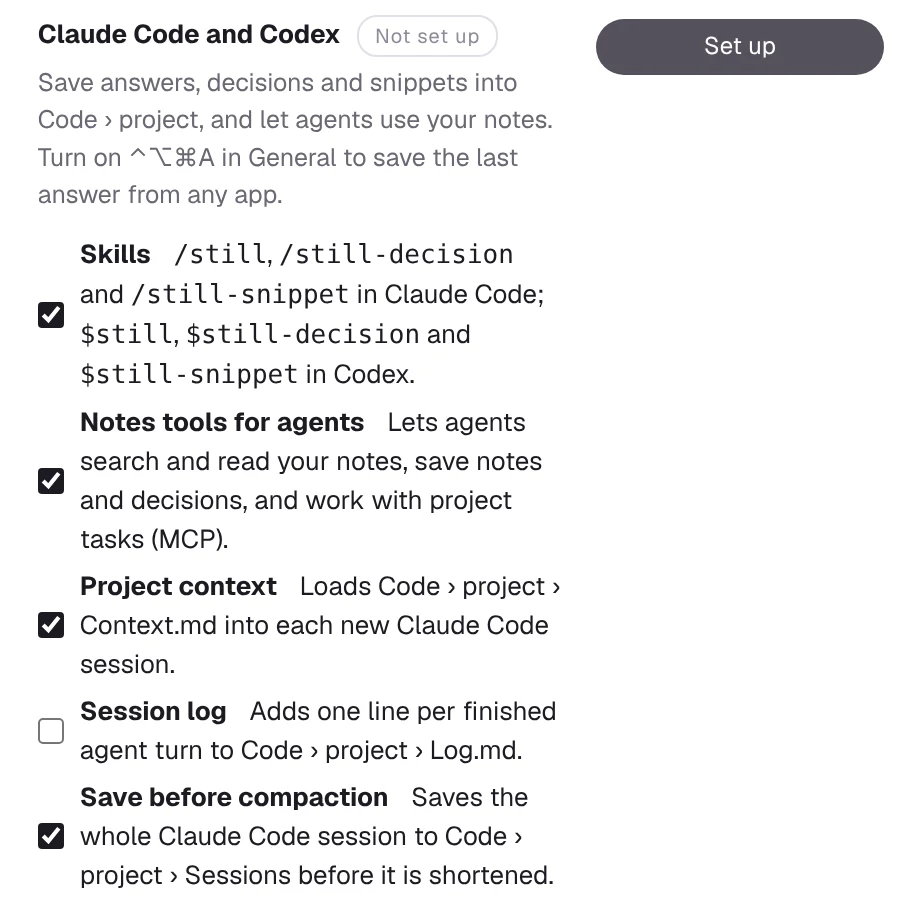
  1. Open Settings › Connections. Find Claude Code and Codex.
  2. Choose what you want, from skills, notes tools, project context, session log and save before compaction, then press Set up.
  3. Start a new agent session. Type /still in Claude Code or $still in Codex. For the key, turn on ⌃⌥⌘A in Settings › General.
Settings, Connections: the Claude Code and Codex row with a switch for each part and a Set up button.

Stays on your Mac

Still reads the session files Claude Code and Codex already keep on your Mac. Nothing is uploaded, and there is no account.

Word for word

Saving never asks the model to retype the answer. What you saw is what you keep, and it costs no tokens.

Your files

Plain Markdown in the folder you chose, synced by iCloud Drive like any other note. If you stop using Still, your notes stay readable.

Private stays private

Locked notes are encrypted, and agents can never search, read or change them.

Questions

Good to know

Which agents does it work with?

Claude Code and the Codex CLI get everything on this page. The notes tools also work in other apps that support MCP servers, such as Claude Desktop or Cursor: add Still's still mcp command in that app's settings.

How does it know the project?

From the folder the agent is running in: the name of its git remote, or the folder's name if there is no remote.

What does the shortcut save if I have several sessions open?

The most recent answer from any session. Inside a session, /still and $still save from that session only, and can save the last few answers together.

Can I turn things off?

Yes. Untick a tool in Settings › Connections and press Apply. Still removes the hooks and notes tools it added and leaves your notes where they are. Skill files stay until you delete them.